How to add a fade-in or fade-out to an iPhone ringtone
Published October 24, 2026 · 4 min read

To add a fade to an iPhone ringtone, edit the audio before you set it, because iOS has no fade control for ringtones: Settings only lets you choose a sound that already exists. A fade-in softens the start, a fade-out softens the end, and both are applied to the audio file itself.
This guide explains when a fade is worth adding, when it makes a ringtone worse, how long it should be, and how to add one with Ringsy or without it.
Do you need a fade at all?
Often not, but a fade fixes two common problems of a clip cut out of a longer sound:
- A click or pop at the start. If you cut in the middle of a wave, the first instant jumps from silence to sound and you hear a tick. A very short fade-in removes it.
- A harsh stop at the end. A clip that ends mid-word or mid-note sounds chopped. A fade-out lets it finish gently.
If the clip starts and ends on quiet moments, such as the pause before a word and the pause after it, you may not need either. Our guide to trimming audio on iPhone explains how to choose clean cut points.
Fade-in or fade-out: which one for a ringtone?
- Fade-in: keep it very short. A ringtone has to get your attention, and a slow build means the first second of every ring is quiet. Half a second is enough to remove a click.
- Fade-out: useful for a sound that is not meant to repeat smoothly, for example the end of a song chorus. It makes the end feel finished.
- Neither: for a text tone or an alert, which plays once for a second or two, start straight away. A fade-in would make it feel late.
When does a fade make a ringtone worse?
A ringtone repeats from its first sample for as long as the phone rings. The fade is part of the file, so it is heard again on every repeat. A long fade-out followed by a quiet fade-in makes the sound dip to nothing at each seam, which on a short clip sounds like a hole.
If you want a ringtone that loops without a gap, end the clip on a point that matches its start instead of fading. Our guide to looping a ringtone smoothly explains how. Ringsy turns its fades off while Smooth loop is on for exactly this reason.
How long should a fade be?
- 0.5 seconds: removes clicks without changing how the sound feels. A good default for a ringtone.
- 1 second: a clearly softer start or end. Fine for a calm tune or music.
- 2 seconds: a slow swell or a long tail. Better for a sound you hear once than for a repeating ringtone.
Anything longer is usually for alarms, where a gentle wake-up is the point. Our guide to custom alarm sounds covers that; alarm sounds are limited to about 30 seconds, so the fade can’t be longer than that.
How do I add a fade in Ringsy?
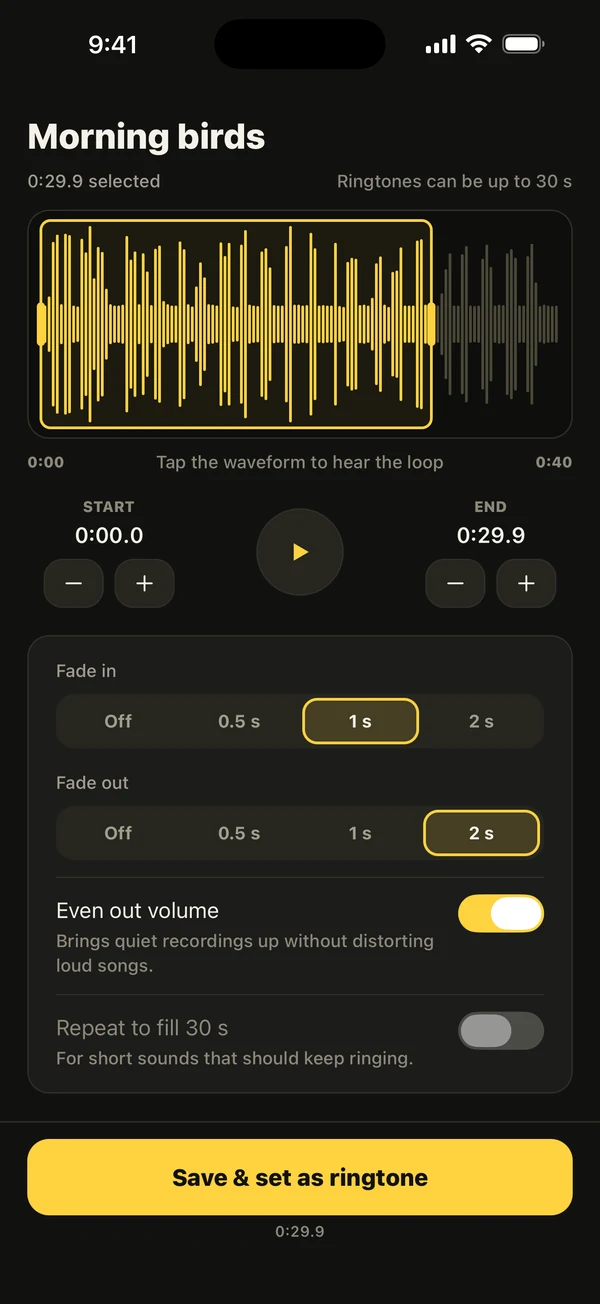
- 1Open the sound: tap Files, Video or Record on Home, or use Share › Ringsy from another app.
- 2Drag the yellow frame to the part you want. A ringtone stops at 29.9 seconds, the iPhone limit.
- 3Under the trim controls, set Fade in and Fade out. Each has Off, 0.5, 1 and 2 seconds.
- 4Tap the waveform to hear the loop. The preview approximates the final render, so listen again after you save if the fade matters to you.
- 5Tap Save & set as ringtone. On iOS 26 and later the share sheet opens and you tap Use as Ringtone; on iOS 17 and 18 Ringsy walks you through GarageBand.

Can I do it without Ringsy?
Yes, with a tool that edits audio. GarageBand can fade a track by drawing volume automation, and many audio editors have a fade command; the exact menus differ between versions, so look for Automation or Fade in the one you use. What does not work is the share sheet’s Use as Ringtone on its own: it uses the file as it is, so the fade has to be in the file before you share it.
What does it cost?
Opening a sound, trimming it, adding a fade and hearing it are free in Ringsy. You meet the question only when you export: your first two ringtones are free in total, and after that Ringsy Unlimited is a one-time purchase with no subscription. Sounds are processed on the iPhone and nothing is uploaded.
Quick facts
- iOS has no fade setting for ringtones; the fade must be in the audio file.
- A fade-in of about half a second removes a click at the start.
- A fade is heard again on every repeat, so keep fades short on a ringtone that loops.
- Text tones and alerts usually need no fade.
- Ringsy offers fades of off, 0.5, 1 and 2 seconds for both ends.
Frequently asked questions
- Can I fade out a ringtone on iPhone?
- Not in iOS settings. Add the fade to the audio before you set it, with an editor such as Ringsy or GarageBand, then use the finished file as the ringtone.
- Why does my ringtone click at the start?
- The clip was cut in the middle of a sound wave, so it jumps from silence to sound. Move the start to a quieter spot or add a fade-in of about half a second.
- Should I add a fade to a ringtone that loops?
- Keep it short or skip it. The fade is part of the file and is heard on every repeat, so a long one makes the sound dip at each seam.
- Are fades free in Ringsy?
- Yes, adding and hearing a fade is free. Exporting counts toward your two free ringtones, and after that it needs Ringsy Unlimited, a one-time purchase.