How to get a scary Halloween ringtone on iPhone
Published October 14, 2026 · 5 min read
To get a Halloween ringtone on iPhone you need a short spooky sound on the phone and then you set it as your ringtone, because iOS only lets you pick from the tones it already holds. You can record your own creepy voice, use a sound file you already have, or use a ready-made Halloween sound from an app such as Ringsy.
This guide covers the three routes, how to set the result on iOS 26 and on iOS 17 or 18, what makes a spooky sound work as a ringtone, and how to switch back on 1 November.
Where do I get a spooky sound?
- Record it yourself. A low whisper, a slow laugh or “Don’t answer…” is the most personal option, and nobody else will have it. Voice Memos works, and so does Ringsy's Record screen.
- Use a sound you already have. Any audio file in Files, or the soundtrack of a video you saved, can be trimmed into a ringtone. Clips from films, games and songs are other people’s work, so keep them to your own phone and don’t share them.
- Use a ready-made sound. Ringsy has a Halloween pack of original tones made for the app, so there is nothing to look up or download from a website.
Whichever you pick, a ringtone must be under 30 seconds long.
What makes a spooky sound work as a ringtone?
A ringtone repeats for as long as the phone rings, often in a pocket or across a room. Atmosphere that is lovely in a film can fail here:
- Start with something you can hear. A quiet, slow build-up means the first seconds of a short ring are silent. Put the spookiest moment at or near the start.
- Avoid long gaps and very quiet parts. A phone speaker is small, and quiet sound disappears.
- Keep it short. A few seconds of a creaking door or an organ chord is enough, and it repeats until you answer.
- Check it loops. Hear it repeat before you commit, because a sound that ends abruptly will click or jump at the seam. Our guide to smooth loops explains why.
- Think about where you take calls. A scream is funny at home and less funny in a meeting.
How do I get one in Ringsy?
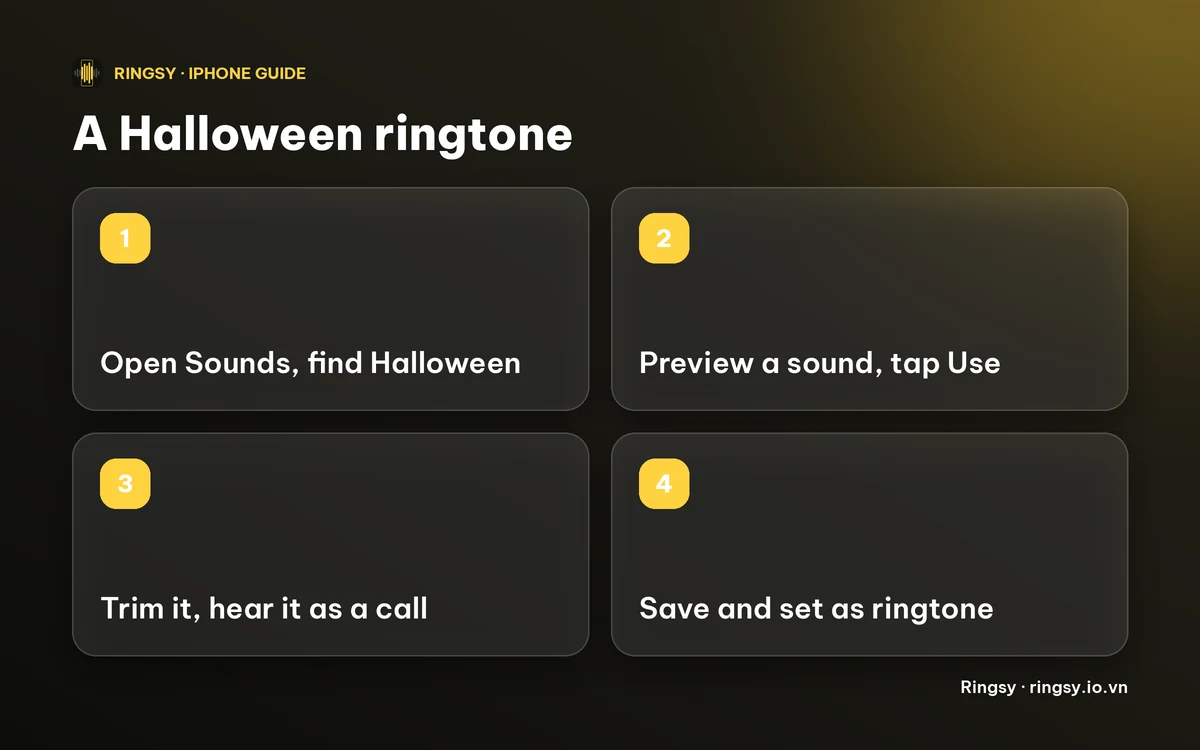
- 1On Home, tap Sounds. In October Ringsy lists the Halloween pack first; the rest of the year it is still there, further down.
- 2The pack has four sounds: Spooky Theremin, Haunted Organ and Bat Flight, which are ringtones of about 12, 13 and 10 seconds, and Creaky Door, a very short alert sound of under 2 seconds that suits a text tone. Tap one to preview it.
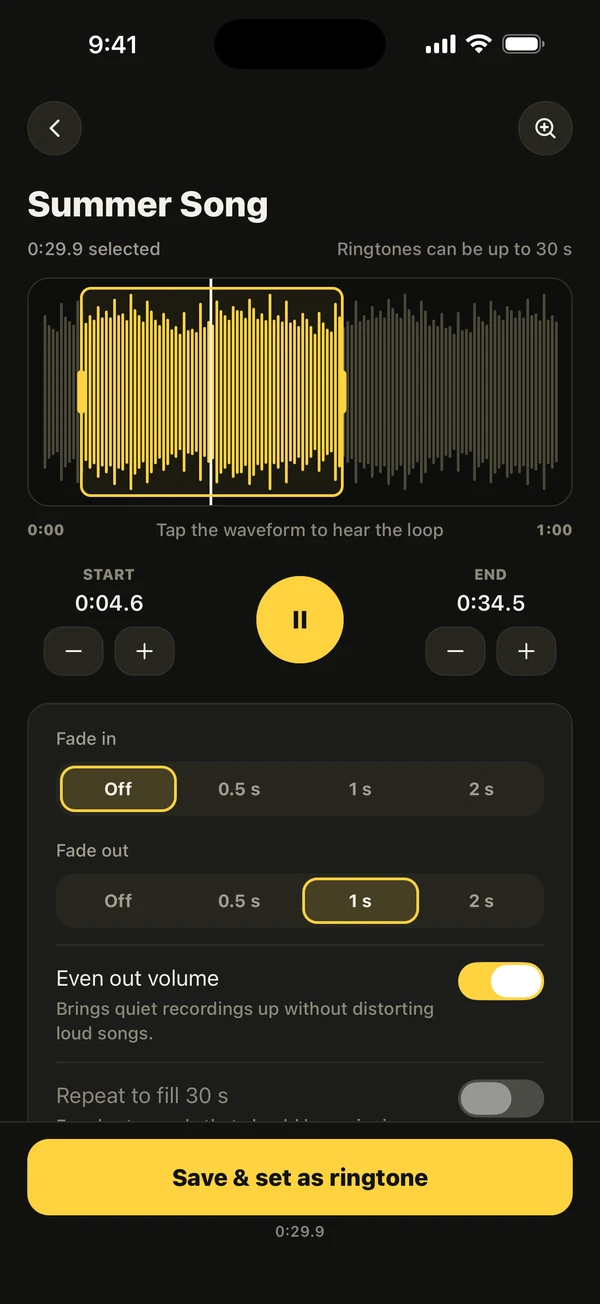
- 3Tap Use. The sound opens in the editor, where you can trim it, add a fade or hear it as a call.
- 4Tap Save & set as ringtone. On iOS 26 and later the share sheet opens and you tap Use as Ringtone. On iOS 17 and 18 Ringsy walks you through the GarageBand steps instead.
To make a voice, tap Record instead, say your line, and in Effects try Deep, Echo, Hall, Robot or Reverse. They are previewed before you pick one. Our funny voice ringtone guide covers that.
How do I set it without Ringsy?
If you already have a sound file under 30 seconds, you can do it with Apple’s own tools.
- iOS 26 and later: in Files or Voice Memos, share the audio and choose Use as Ringtone.
- iOS 17 and 18: import the file into GarageBand, then use Share › Ringtone and choose Use sound as › Standard Ringtone.
Then check Settings › Sounds & Haptics › Ringtone. The new tone is listed at the top, under Ringtones, and tapping it selects it and plays it. Menu names can differ slightly between iOS versions. Our guide to making a ringtone without a computer has the full steps for both routes.
Can I make it ring only for one person?
Yes, and it is the classic Halloween prank. Open the contact, tap Edit › Ringtone and pick the spooky tone, and only that person’s calls use it. Everyone else keeps your normal ringtone. The same works for Text Tone. Our guide to setting a ringtone for one contact has the steps.
How do I switch back after Halloween?
Settings › Sounds & Haptics › Ringtone, then tap your usual tone. If you used a contact ringtone, open the contact, tap Edit › Ringtone and pick another one, or Default. To remove the spooky tone from the list completely, see our guide to deleting a custom ringtone.
What does it cost?
Previewing every Halloween sound is free. The Spooky Theremin is free to use as a ringtone. The other three need Ringsy Unlimited, a one-time purchase with no subscription. Your first two exported ringtones are free in total, so the free Spooky Theremin counts as one of them. Recording your own voice and the effects are free to try. Sounds are made and rendered on the iPhone and nothing is uploaded.
Quick facts
- iPhone ringtones must be under 30 seconds.
- Put the spookiest part first and hear it loop before you set it.
- Ringsy's Halloween pack: Spooky Theremin, Haunted Organ, Bat Flight and Creaky Door.
- A contact ringtone makes it ring only for one person, and it is easy to undo.
Frequently asked questions
- Does iPhone have a Halloween ringtone?
- Not a seasonal set that you can count on. To get one, add a spooky sound yourself, by recording it, using a sound file or using an app such as Ringsy that has a Halloween pack, and set it as your ringtone.
- How do I set a scary sound as my iPhone ringtone?
- Get the sound onto the phone as a clip under 30 seconds, then on iOS 26 and later share it and tap Use as Ringtone. On iOS 17 and 18 use GarageBand’s Share › Ringtone. Finally choose it in Settings › Sounds & Haptics › Ringtone.
- Are Ringsy's Halloween sounds free?
- You can preview all four for free. Spooky Theremin is free to use as a ringtone, and it counts as one of your two free exports. Haunted Organ, Bat Flight and Creaky Door are part of Ringsy Unlimited, a one-time purchase.
- Can I make a Halloween ringtone from my own voice?
- Yes. Record a short line, then try Deep, Echo, Hall, Robot or Reverse to make it sound eerie. Ringsy previews each effect and keeps the recording on your iPhone.